


flexgold
Set up a savings plan
simply explained
Only 3% (gold) and currently 7% (silver) surcharge on the spot price
Special conditions from as little as €0/CHF
-
 Oliver Fröhner
- Aktualisiert am 30. April 2026

Our experiences with the flexgold savings plan
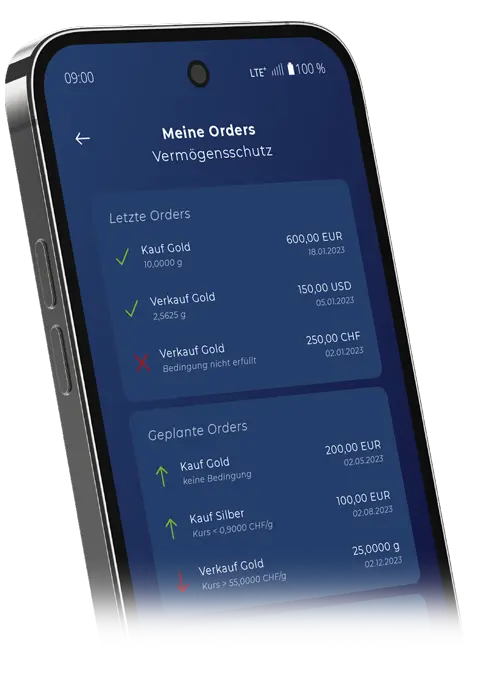
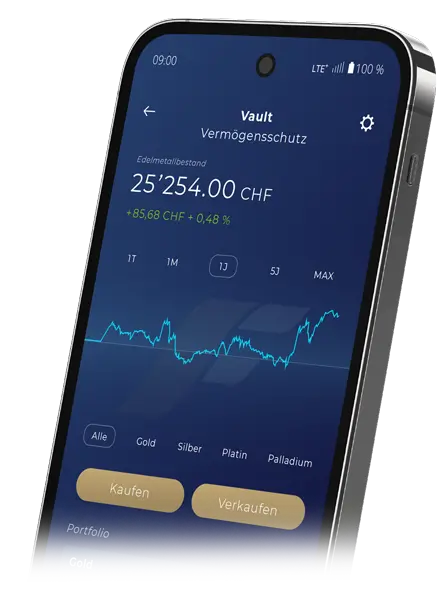
From our perspective, the new “flexgold” product from Solit is not only the most advanced product on the market for fast and flexible trading with or investing in precious metals with simultaneous secure storage in Switzerland, but also a very flexible product for setting up savings plans.
With a custody fee of only 1.2% per year, it is an extremely competitive product for long-term wealth accumulation.
For us, it’s clearly the product for modern trading with simultaneous secure storage and protection against any dangers such as theft, insolvency, or similar.
Naturally, we again offer you special conditions here. (only 3% (Gold) and 5% (Silver) premium on the London spot price.
In the following, we will explain in detail the various steps to complete your savings plan.

Personal consultation
Additionally, as usual, I am always available for a personal consultation for any questions regarding flexgold or precious metals in general.
You can reach me by phone (landline +49 6201/687658 or mobile +49 151/57155799) during the day, but also in the evenings or on weekends.
If you prefer to write, feel free to send me a message or chat with me via WhatsApp.
Your Dipl.-Betrw. (DH) Oliver Fröhner
Set up a flexgold savings plan
Below we explain the individual steps to complete your flexgold savings plan.
There are 3 process steps to go through for a new savings plan: creating a new vault, topping up credit and the actual process for creating the savings plan.
Process step 1 explained in 5 steps
Create a new vault for the savings plan
Create your own vault for the savings plan
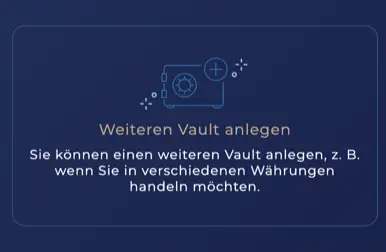
As with a one-off investment, it makes sense to create your own vault for your savings plan. If you want to create a savings plan for several types of precious metals, it can also be useful for evaluation purposes to create several vaults for e.g. gold and silver.
Select vault type
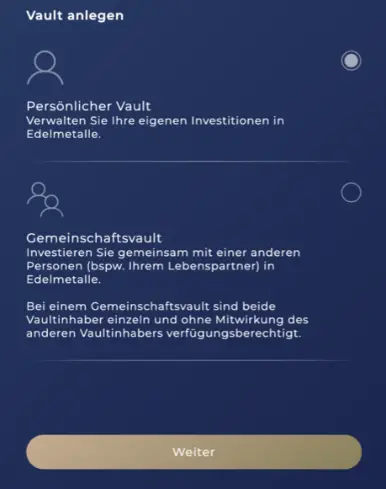
Set up a reference bank account
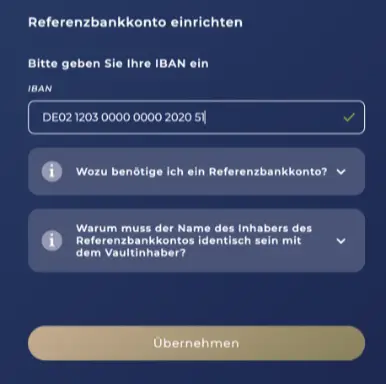
Enter the IBAN of your reference bank account here.
Accept reference bank account
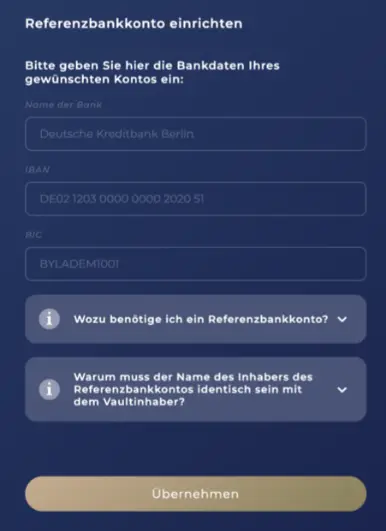
Check the data and click on "Accept"
Assign a vault name
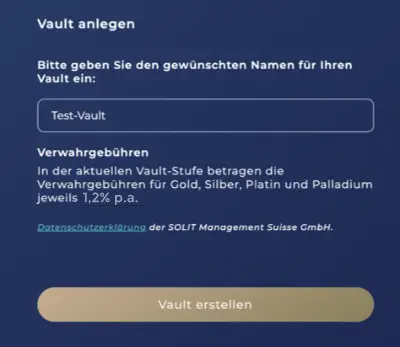
Finally, give your vault a name. e.g. S"ilver savings plan grandchild" or similar.
Process step 2
Top up credit
After we have created the vault, it is usually ready within a few minutes to carry out the next two processes.
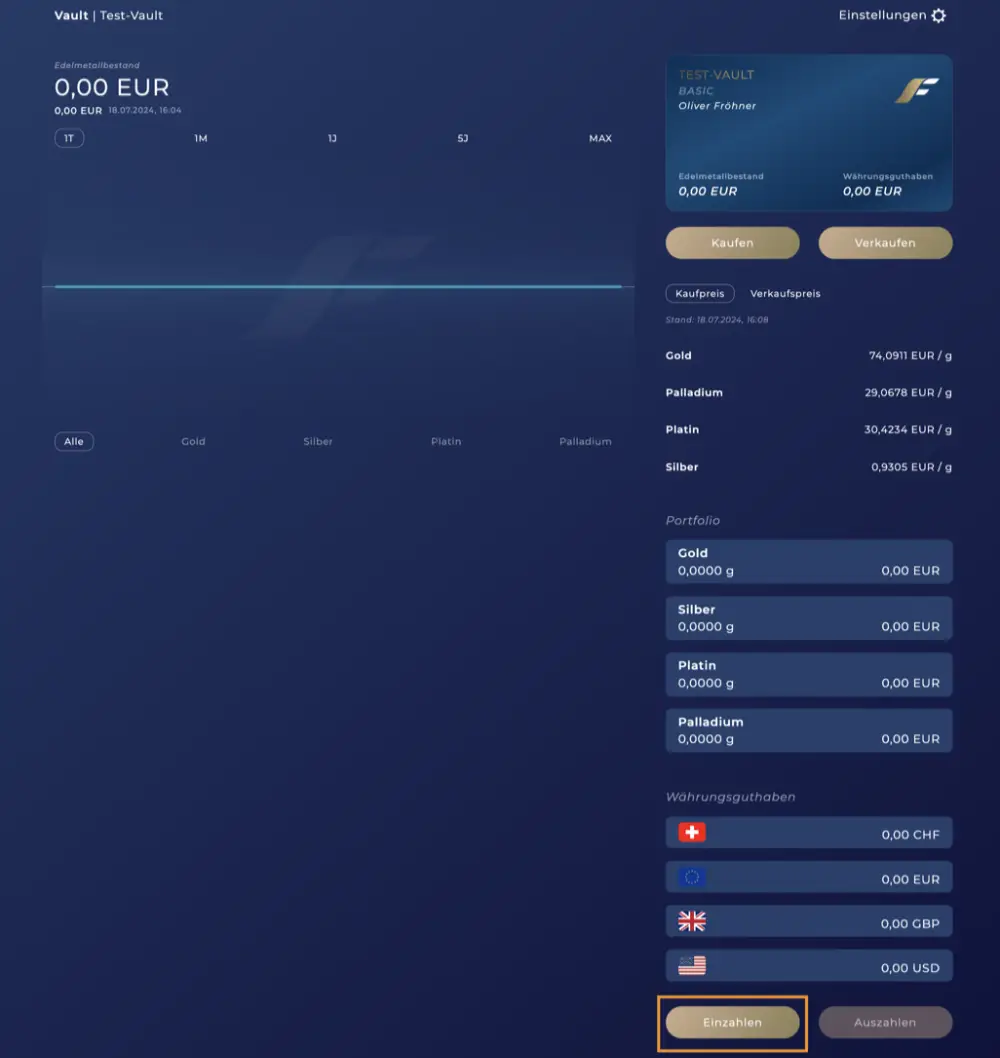
First, credit must be added to the vault. To do this, click on “Deposit” below.
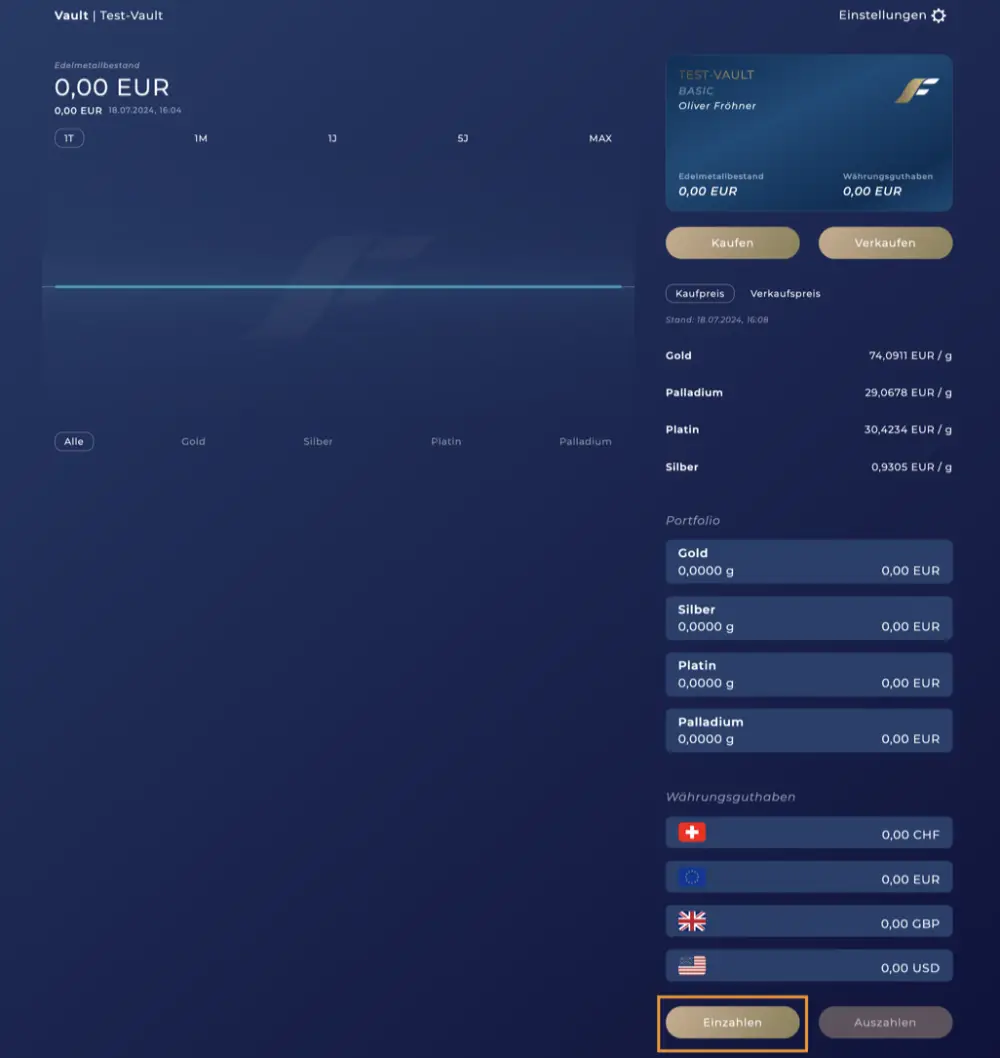
You now have the choice between several currencies. You will receive a specific IBAN for each currency. Use your vault ID for the purpose of your transfer. It is best to use the “Copy” function to avoid typos.

Process step 3 explained in 7 steps
Complete savings plan
Buy savings plan
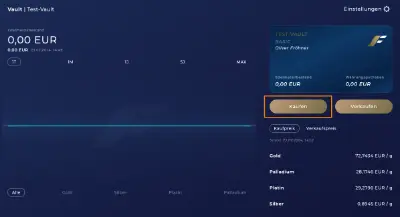
Click on "Buy" in your vault to start the savings plan purchase process
Select savings plan
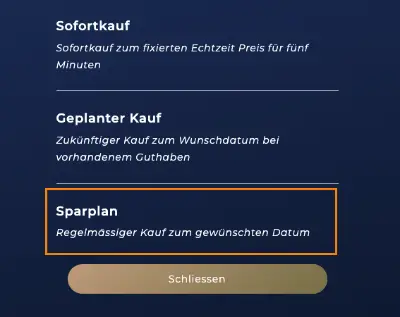
Select "Savings plan"
Select precious metal and currency
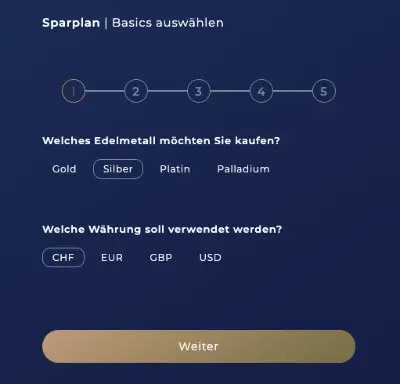
Select the precious metal and currency here. You can only select 1 precious metal per savings plan. If you want to conclude a savings plan for e.g. gold and silver, you need a second vault.
Select time
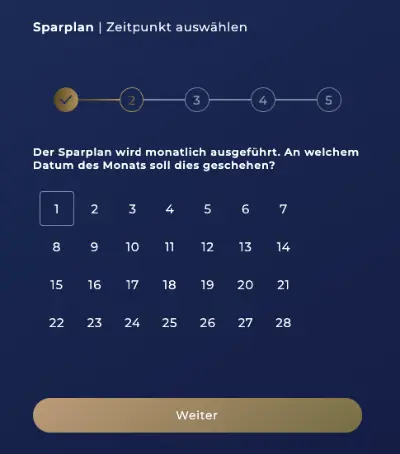
Here you select the day (time) on which the savings plan should be executed monthly.
Select amount
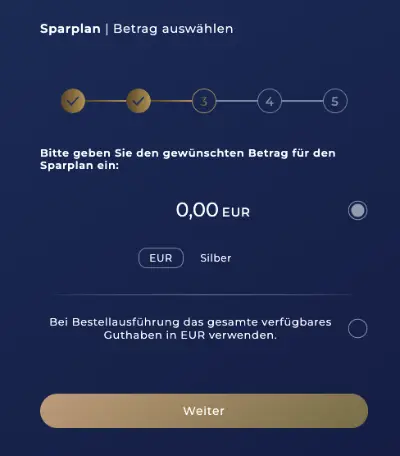
Select the desired monthly savings plan amount here. The currency and the type of precious metal are also displayed again for control purposes. (EUR and Silver)
Select conditions
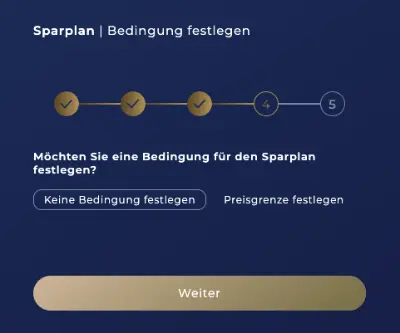
In the next step, you have the option of setting a price limit for the savings plan. If the current price on the execution day is above your limit, the savings plan will not be executed.
Check order
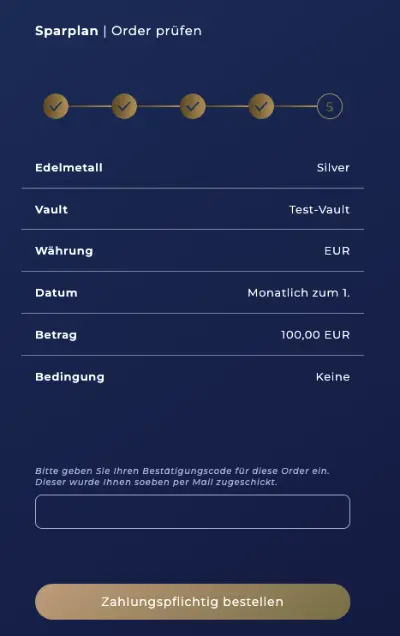
In the last step, you have the opportunity to check all the information again.
At the same time, a confirmation code has already been sent to you by email to execute the order.
After you have entered this and clicked on "Order with obligation to pay", your savings plan is active and will be executed on the next execution day.
Protect Assets with flexgold
- 100% insured, securely stored in Switzerland
- Invest in Gold, Silver, Platinum, or Palladium
- Trade Digitally at Real-Time Prices
- Dedicated Contact Person
- Contractual Partner = SOLIT Group AG
flexgold prices for savings plans
flexgold Prices
Gold 3% Premium on Spot Price
Silver 7% surcharge on spot price
Platinum 7% surcharge on spot price
Palladium 7% surcharge on spot price
+ Storage Fee ONLY 1.2% / Year
The sale of precious metals takes place at the spot price WITHOUT premiums!
flexgold Prices
Gold 1.75% Premium on Spot Price
Silver 5.75% surcharge on spot price
Platinum 5.75% surcharge on spot price
Palladium 5.75% surcharge on spot price
+ Storage Fee ONLY 0.85%/Year
The sale of precious metals takes place at the spot price WITHOUT premiums!
flexgold TOTAL Prices
Here again in a tabular overview the surcharges on the spot price when buying. As soon as you have registered via a “Register for free” button, the discounted prices will be stored in your account. You will then automatically see the final prices that apply to you in the app.
You will automatically be upgraded to the cheaper “Advanced” tariff as soon as your purchase volume exceeds CHF 250,000.
| PRECIOUS METAL | BASIC VAULT <br> < CHF 250,000<br>here with the premium partner<br>Spot price + x% | BASIC VAULT <br>< CHF 250,000<br>Annual Storage Fee | ADVANCED VAULT<br> > CHF 250,000<br>here with the premium partner<br>Spot price + x% | ADVANCED VAULT<br> > CHF 250,000<br>Annual Storage Fee |
|---|---|---|---|---|
| GOLD | 3,0% | 1,2% | 1,75% | 0,85% |
| SILVER | 7,0% | 1,2% | 5,75% | 0,85% |
| PLATINUM | 7,0% | 1,2% | 5,75% | 0,85% |
| PALLADIUM | 7,0% | 1,2% | 5,75% | 0,85% |
FAQ flexgold savings plan
Who is behind flexgold?
flexgold is backed by the SOLIT Group, which has been active in precious metals trading since 2008 and is now one of the leading precious metals dealers in the German-speaking world. The SOLIT Group’s headquarters have been in Tägerwilen in the Swiss canton of Thurgau since 2021. The SOLIT Group has already received numerous prestigious awards for its services, including multiple seals from FOCUS MONEY as “Best Provider of Gold Savings Plans” and “Best Precious Metals Dealer”.
Which Operating Systems Are Supported?
The flexgold app is available for all mobile phones and smart devices with the iOS or Android operating system. For iOS, at least version 12.4 is required; for Android, version 9. Additionally, flexgold can be used via the browser at https://app.flexgold.com/.
Where Can I Download the App?
The flexgold app is available for both Apple iOS and Google Android. You can download the app for free and open your flexgold user account directly on your mobile phone, tablet, or other smart devices. Please use the latest software version of the application. Alternatively, the app is also available for desktop browsers.
Click here for the iOS App Store.
Click here for the Google Play Store.
How Long Can Money Remain in My flexgold Currency Account?
Since flexgold is regulated as a financial intermediary by the Swiss Financial Market Supervisory Authority (FINMA) and supervised by PolyReg, but does not have a banking license, the maximum retention period for a user’s money in the currency account is 60 days. To guarantee compliance with this period, a time buffer is used, so that the money is transferred back after 42 days.
Which Precious Metals Are Available?
At market entry, flexgold offers four precious metals: Gold, Silver, Platinum, and Palladium.
In Which Currencies Can Precious Metals Be Purchased?
With flexgold by Solit, precious metals can be purchased in CHF (Swiss Francs), EUR (Euro), GBP (British Pounds), and USD (US Dollars).
Where is My Data Secured with flexgold by Solit, and How is it Stored?
Generally, login procedures are protected by the use of two-factor authentication (2FA) as a form of multi-factor authentication (MFA). Additionally, all transactions carried out by you are confirmed by the aforementioned procedure. All data transmission is encrypted. We pay close attention to compliance with both the General Data Protection Regulation of the European Union and the Swiss Data Protection Act. Personal data and backups are stored exclusively on servers in Switzerland.
How Does Verification Work with flexgold?
After successful registration with flexgold, verification can be started. For this, you will be redirected to the IDnow page. Identification takes place either via the IDnow AutoIdent app or via the browser.
Which Documents Do I Need for Verification?
For successful verification, a valid identification document is required. This can be either a photo ID or a passport, through which you can be uniquely identified.
What is a Vault?
With flexgold, the English word “Vault” refers to the digital space where investors can manage their physical precious metals. In addition, possible linguistic differences, such as in spelling, are taken into account and the correct German variant is used. The Vault symbolizes the high-security vault facility in Switzerland where the precious metals are securely stored.
What Types of Vaults Are There?
With flexgold by Solit, there are three types of vaults:
- The Personal Vault allows you to manage your own precious metal investments.
- The Community Vault allows you to make precious metal investments together with another person (e.g., your life partner).
- The Corporate Vault allows you to diversify your company’s assets through investments in precious metals.
How is a Vault Created?
During the setup of Flexgold, you will be prompted to automatically create a vault. If you want to create additional vaults, click the Home button and then the “Create another Vault” field. You can give your vaults names, for example, according to their purpose (e.g., retirement provision).
Can I Grant Another Person Access to My Vault?
You cannot grant another person access to your vault if you have a personal vault.
You must set up a Community Vault if you want to grant another person access. However, there are exceptions, such as in cases of death or the appointment of a guardian, where corresponding regulations are provided by law.
How Do I Create a Community Vault?
To create a Community Vault, click the “Profile” button and then “Master Data”. Then select “Create New Master Data” and you can create a new Community Vault under “Community Master Data”.
How Can I Deposit Money into My flexgold Vault?
You can deposit into your flexgold vault via bank transfer from your bank account. It is required that the bank account holder matches the vault holder. Deposits can be made in Swiss Francs, Euros, British Pounds, or US Dollars.
How Can I Make a Withdrawal from a Vault?
You can manually withdraw the balance from your currency account to your reference bank account at any time. If no withdrawal amounts are available, you must click the “Sell” button in the desired vault. Then you must select the precious metal inventory to be sold and the order type. After a successful sale, you can have your currency balance paid out to the registered reference bank account.
How Long Does it Take for My Deposit to Be Credited to My Vault?
The credit depends on the respective bank. As soon as the money is credited to our bank account, we will credit your deposit to your vault on the same day.
Where is the Bank Account for Deposits to My Vault Located?
The bank account to which customers can deposit money is located at Credit Suisse AG in Switzerland, which is a subsidiary of UBS Group AG.
What Happens to My Investment Amount if the Bank Where I Temporarily Deposited it Becomes Insolvent?
Under the statutory deposit insurance scheme, bank deposits up to CHF 100,000 are secured.
What Happens to My Vault in Case of Insolvency?
The precious metal holdings in your vault are considered special assets and are therefore excluded from the insolvency estate in the event of a service provider’s insolvency.


[ADVERTISEMENT]
This page contains affiliate links. If you make a purchase through these links, we may receive a small commission — at no additional cost to you. This helps us keep the website free and without extra advertising. Thank you for your support! ❤️
For more information about our partners and data processing, please see our
**[DISCLAIMER]**: Recommendations of precious metal deposits (e.g. SOLIT, FlexGold), other financial products , comparison calculators and technical gadgets do not constitute financial or professional advice. Please consult a financial advisor or specialist dealer before using them. We accept no liability for any damage or loss that may result from the use of the recommended products or services. Details can be found in our disclaimer.